General, quoting & support.
Add: Building E, No.58, Nanchang Road, Xixiang , Baoan District Shenzhen City, Guangdong, China
Tel : 0755-27348887
Fax : 0755-27349876
E-mail : svc@pcbastore.com

How to Test a Circuit Board: A Comprehensive Troubleshooting Guide
PCBA Store / 2026-03-06
Contents [hide]
Keeping electronic gadgets working well takes more than solid building. It calls for a careful plan for checks and fixes. You might face a test model that fails to start. Or you could deal with an old setup that acts up now and then. In any case, knowing how to test a circuit board is a key ability for builders and workers. A step-by-step plan helps spot bad parts early. This stops big breakdowns in the system. This guide covers the best ways to check things. It goes from basic hand looks to tools with gear. At PCBA Store, we build these strict check steps into our build flow. As a top world giver, we make sure each board we make holds up to the best levels of work steadiness and trust.
Understanding the Basics of PCB Failure
Before you jump into set check ways, it helps to spot signs of a board that is going wrong. Knowing how to tell if circuit board is bad often begins with watching how the gadget acts. Usual hints are odd scents (like "burnt wires"). You might see black marks. Or the thing shows no sign when you add power.
But lots of problems stay out of plain sight. Short paths inside, breaks in lines, or worn parts can lurk in the levels of a stacked PCB. To find these, you shift from just watching to hands-on checks.
The Visual Inspection Method: The First Line of Defense
Any fix job should start with a full visual inspection method. This is the cheapest and fastest way to catch clear body flaws.
What to Look for During Visual Inspection
· Burnt Components: Check for color shifts or "cooked" spots on the board.
· Physical Damage: Splits in the PCB base or snapped lines.
· Soldering Defects: Weak solder ties, solder links, or "tombstoning" where a part lifts from the spot.
· Leaking Electrolytic Capacitors: Watch for swelled tops or wet marks near the bottom of the capacitor.
· Corrosion: This shows up a lot in gadgets hit by damp or bad batteries.
The visual inspection method works well to find build slips and plain part breaks. Yet it can't prove the powerful health of the path. For that, you need special gear.
How to Test a PCB with a Multimeter
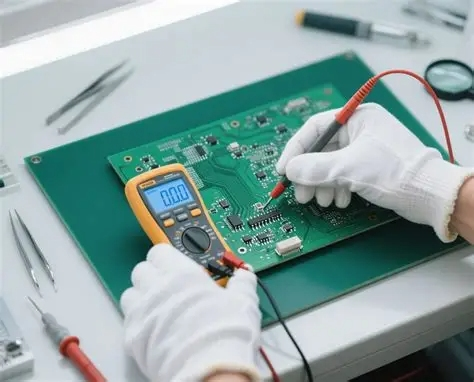
The top all-around tool for any worker's set is the digital multimeter (DMM). Knowing how to test a PCB with a multimeter lets you look deep into the power traits of the board.
Continuity Testing
The first step in how to check a circuit board for power is a continuity test. This checks if there is a steady path for flow between two spots.
· Set the multimeter to continuity mode (often shown by a wave sign).
· Put the tips on both sides of a line or wire.
· A sound means a good link. No sound points to a break or snapped line.
Voltage Testing
To do a live check, the board needs power on. You must take great care. This avoids linking pins with the tips.
· Look at the in power to confirm the board gets juice.
· Check the out-of-power setters (like 3.3V, 5V, or 12V lines).
· If one line shows 0V or way less than needed, it gives a main hint. In how to find bad components on circuit board cases, this could mean a linked cap that pulls too much.
Resistance Testing
Checking resistance spots shorts or worn resistors. If a part marked "10k Ohms" shows as a break or 0 Ohms, it is done for.
Component-Specific Testing
When a broad board check shows a problem, the next task is to pin down the exact defective electronic components. This means knowing how each part acts on its own.
Testing Resistors and Capacitors
Resistors are easy to check with the DMM's resistance choice. Capacitors pose more challenges. Some multimeters offer a cap setting. But a "short" check often tells more. If a cap shows low resistance (near 0 Ohms), it is linked and must go.
Testing Diodes and Transistors
Diodes let flow go one way only. Most multimeters have a "Diode Test" mode. It shows the forward drop (often 0.6V to 0.7V for silicon types). If it reads 0V both ways, the part is linked. If it shows "OL" (Open Loop) both ways, it is blown.
Integrated Circuits (ICs)
Checking ICs is the hardest part of how to check a circuit board. ICs hold many inner gates. So you can't test them fully with a multimeter. Instead, check for:
· Too much warmth (ICs should not feel hot to touch).
· Links between VCC (Power) and GND (Ground) pins.
· Flow action on out pins with a scope.
Advanced Diagnostic Techniques
For tricky boards, old hand ways may fall short. Pro labs and build spots use top gear to speed up how to find bad components on circuit board jobs.
1. In-Circuit Testing (ICT)
ICT uses a "bed of nails" setup to touch many checkpoints on the PCB at once. It looks for links, breaks, and part values in moments.
2. Flying Probe Testing
It acts like ICT but with robot tips that shift over the board. This is slower than ICT. Yet it skips costly set fixtures. So it fits test models well.
3. Thermal Imaging
An infrared camera lets workers see "hot areas" on a board. If a part pulls extra flow from an inner link, it lights up on the heat map. This gives a quick fix on how to tell if circuit board is bad.
4. Oscilloscope Analysis
A multimeter gives a still "picture." But a scope shows the "film" of signal moves over time. This is key for fixing time slips, buzz, or signal hold issues.
Summary of Troubleshooting Steps
To sum up, if you want to know how to test a circuit board in a good way, use this order:
1. Visual Inspection: Check for body harm and burnt spots.
2. Power Check: Confirm the power source and voltage lines.
3. Continuity Check: Make sure lines hold and no links sit between power and ground.
4. Component Testing: Pin down resistors, diodes, and caps with a DMM.
5. Signal Analysis: Use a scope for hard IC and logic fixes.
PCBA Store: Your Expert Partner in High-Reliability Manufacturing
When a job gets too hard for hand fixes, you need a build ally that adds trust from the start. At PCBA Store, we go beyond just giving. We are a full builder and plant set on cutting flaws before they hit you. Our spots have the newest in Automated Optical Inspection (AOI), X-ray checks, and In-Circuit Testing (ICT). This makes sure every PCB setup we send is perfect. We stand by our "Quality First" view. We offer clear tech help and strong skills. These cover quick samples to big runs. If you face new design hurdles or seek a steady, long-run ally, we bring the know-how, gear, and speed. This lets you launch electronic items with full trust. Reach out now. Learn how our top checks and setup help can smooth your supply line.
Frequently Asked Questions
Q: Can I test a PCB while it is still plugged in?
A: You can do voltage checks with power on. But resistance and continuity tests need to be powered off. This keeps the multimeter safe and checks true.
Q: What is the most common cause of a bad circuit board?
A: Heat buildup and power jumps lead the way. They often cause defective electronic components. Think blown caps or linked transistors.
Q: Is it possible to fix a broken trace discovered during a continuity test?
A: Yes, small snapped lines can get jumped with a thin "jumper wire." Solder it between the closest good tie spots.
Q: Why does my multimeter beep when I touch power and ground?
A: This shows a straight short path. It is a big sign of a bad board. Often, a part like a cap or IC has gone wrong inside.
You Might Like:



